
The personal form can be opened in several different ways:
- By clicking on the button on the row of buttons that shows the image of a person
- By right-clicking on a person in the Overview Form
- By double-clicking on a child in the Family Form
- By double-clicking on one of the parents in the Family Form
- By right-clicking on a person in the person list
- By double-clicking on a person in the to-do list
- By double-clicking on the key person in the person list
The person form shows all information about a single person.
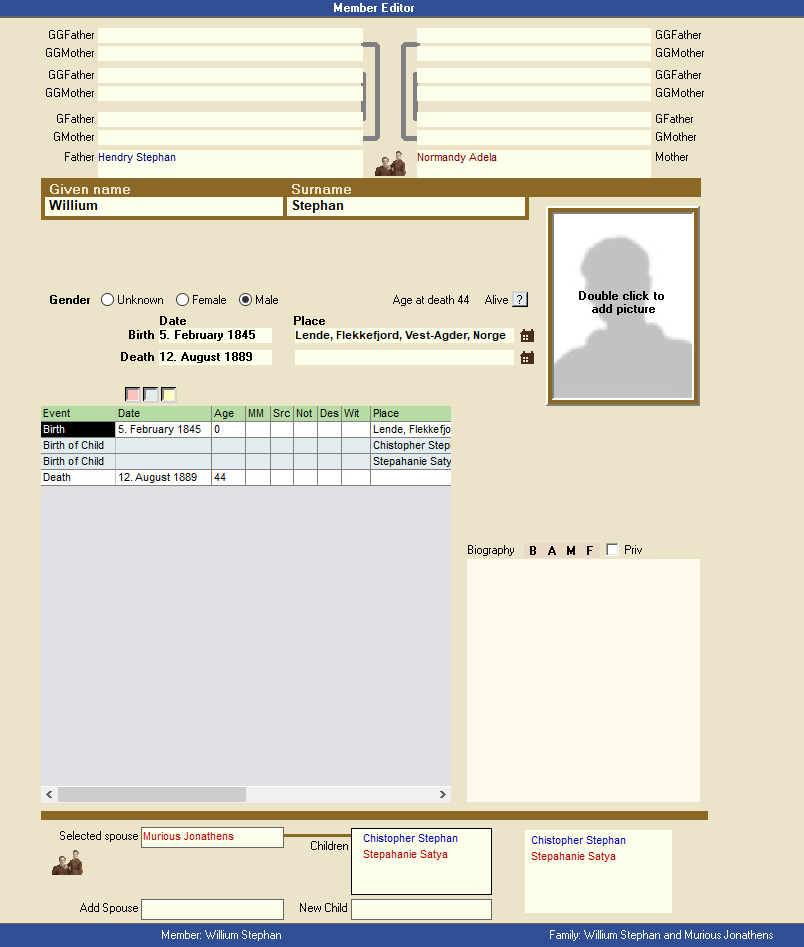
The personal form consists of three parts:
- The upper part shows the person’s immediate ancestors as parents, grandparents and great-grandparents – all three generations.
- The part in the middle consists of many different detail fields. Here you can fill in or change names, gender, dates, place names, events, photos, biography, address, etc. This is also where we add sources. It is also possible to change the design of this part to suit you. As you learn to use the program, you can change the form. You make changes from Tools >> Program Setup >> Person
- The third and lower part of the person form shows all relationships, children and grandchildren of the person in the center – three generations.
It is possible to have all possible sizes on the window that contains the genealogy program. if the window is small to parts of the ancestors and descendants do not show. By changing the screen resolution want the person form also change. At low resolution it is not room for everything in the window and thus ancestors and descendants will not show. The best is maximize the entire window of the genealogy program so that there is as much space as possible for information in the Person Form
- The first thing that disappears with a small window is the generation of grandparents
- At high resolution, the field for relationships and children will be displayed.
- At even higher resolution, you will see that the field for father and mother shows both name, date of birth and place, as well as date and place of death.
Leave a Reply